
Analytics
The SDK broadcasts events that will allow you to integrate a web widget with an external analytics tool e.g. Google Analytics
Example
<script>
    window.initKBWebSDK = function (SDK) {
        const bot = SDK.initKBChatbot({
            "token": "TOKEN"
        });

        // subscribe to all events
        SDK.on('*', function(event) {
            console.log(event.type);
            console.log(event.properties)
        });

        // subscribe only for a specific event
        SDK.on('web.chatbot.load', function(properties) {
            console.log(properties)
        });
    }
</script>
Callback signature
SDK.on('web.chatbot.chat.show', function(properties) { ... })— callback receives the event properties object directly.SDK.on('*', function(event) { ... })— callback receives{ type, properties }.
Most events include user_locale when the widget locale is set.
Custom Stat Events
You can subscribe to handle stat events set in the dashboard. E.g. when You add action:
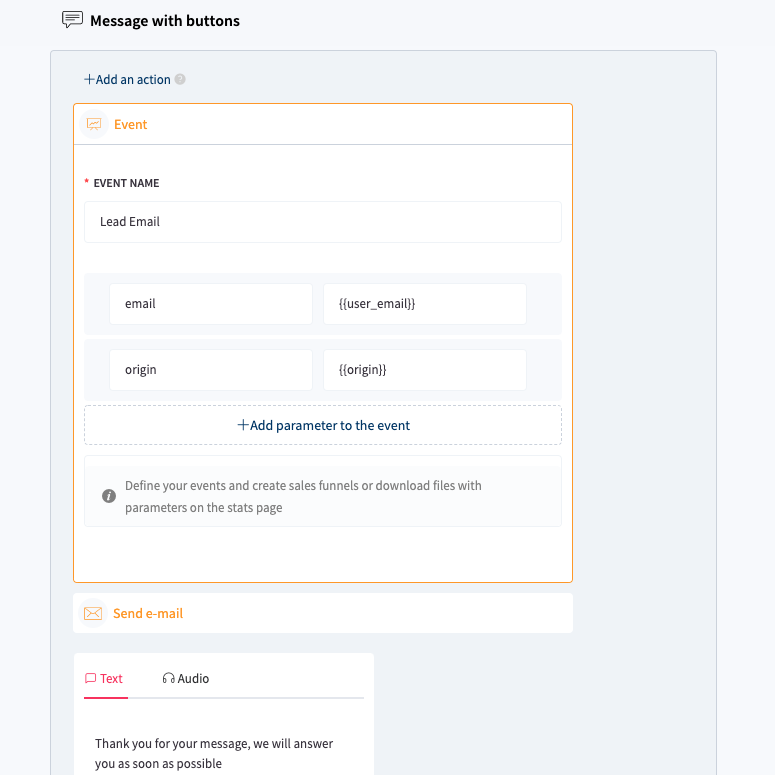
Subscribe using the event name from the dashboard, prefixed with web.chatbot.chat.custom.:
// event name in dashboard: "Lead Email"
SDK.on('web.chatbot.chat.custom.Lead Email', function(properties) {
    console.log(properties); // {email: "", origin: ""}
});

// event name in dashboard: "RefreshSession"
SDK.on('web.chatbot.chat.custom.RefreshSession', function(properties) {
    console.log(properties);
});
System Events
Widget (SDK layer)
Events emitted by the SDK shell (chat bubble, promo message, mask).
| Event | Properties | Description |
|---|---|---|
web.chatbot.load |
| Widget initialized |
web.chatbot.button.show |
| Chat bubble shown |
web.chatbot.chatbotIcon.click |
| User clicked the chat bubble (open/close) |
web.chatbot.mask.click |
| User clicked the background mask |
web.chatbot.promoMessage.show |
| Promo message shown |
web.chatbot.promoMessage.hide |
| Promo message hidden |
web.chatbot.promoMessage.clickOpen |
| User clicked open on promo message |
web.chatbot.promoMessage.clickClose |
| User clicked close on promo message |
web.chatbot.chat.show |
| Chat window opened |
web.chatbot.chat.hide |
| Chat window closed |
Chat interactions (widget layer)
Events emitted from inside the chat iframe (buttons, input, menu).
| Event | Properties | Description |
|---|---|---|
web.chatbot.chat.button.click |
| User clicked a button inside the chat (postback button, carousel button, or inline block link in message content) |
web.chatbot.chat.quickReply.click |
| User clicked a quick reply |
web.chatbot.chat.persistentMenu.clickIcon |
| User clicked the hamburger menu icon (requires persistent_menu enabled) |
web.chatbot.chat.persistentMenu.clickItem |
| User clicked a persistent menu item |
web.chatbot.chat.input-active |
| User focused the message input |
web.chatbot.chat.input-inactive |
| User blurred the message input |
web.chatbot.chat.userTyping |
| User is typing in the message input (debounced) |
web.chatbot.chat.clickLink |
| User clicked a web_url link in the chat |
web.chatbot.chat.clickCustomIcon |
| User clicked a custom icon in the chat footer |
web.chatbot.chat.inquiry.click |
| Discrete interaction with a survey form: rating selection, submit, closing the end-session or dislike feedback modal. Does not fire while typing in text fields — use inquiry.typing instead. |
web.chatbot.chat.inquiry.typing |
| User is typing in a survey form text field (e.g. “Why?” comment after rating). Emitted on the first keystroke, then debounced (300 ms) while typing continues. |
web.chatbot.chat.likeDislike.click |
| User clicked like or dislike on a message (including removing a rating) |
Survey forms (inquiry.*)
Survey forms share the same events regardless of where they appear:
| Context | When it shows |
|---|---|
| Conversation rating block | Inline form at the end of a conversation flow |
| End-session modal | When the user ends the chat and an exit survey is configured |
| Dislike feedback modal | After clicking dislike on a message (when a feedback form is configured) |
Use both events to detect activity during a survey (e.g. reset an inactivity timer):
SDK.on('web.chatbot.chat.inquiry.click', function (properties) {
    // rating selected, form submitted, modal closed
});

SDK.on('web.chatbot.chat.inquiry.typing', function (properties) {
    // user typing in a comment / text field
    // properties.text — current field value
});
Messages
| Event | Properties | Description |
|---|---|---|
web.chatbot.chat.message.user |
| User sent a text message (emitted after bot response). Payload: { who: "user", block: { type: "message", text }, meta } |
web.chatbot.chat.message.bot |
| Chatbot sent a message |
web.chatbot.chat.message.moderator |
| Moderator sent a message |
Note: web.chatbot.chat.message.user is not emitted on button clicks inside the chat. Use web.chatbot.chat.button.click or web.chatbot.chat.quickReply.click instead.
Tracking user activity
To detect any user interaction with the bot (e.g. reset an inactivity timer), subscribe to all events and filter:
var interactionEvents = [
    'web.chatbot.chatbotIcon.click',
    'web.chatbot.chat.button.click',
    'web.chatbot.chat.quickReply.click',
    'web.chatbot.chat.persistentMenu.clickIcon',
    'web.chatbot.chat.persistentMenu.clickItem',
    'web.chatbot.chat.message.user',
    'web.chatbot.chat.userTyping',
    'web.chatbot.chat.inquiry.typing',
    'web.chatbot.chat.input-active',
    'web.chatbot.chat.clickLink',
    'web.chatbot.chat.inquiry.click',
    'web.chatbot.chat.likeDislike.click'
];

SDK.on('*', function(event) {
    if (interactionEvents.indexOf(event.type) !== -1) {
        // user interacted with the bot
    }
});